P3 SystemAnalysis + full-stack
Purchasing, sales and inventory in one system
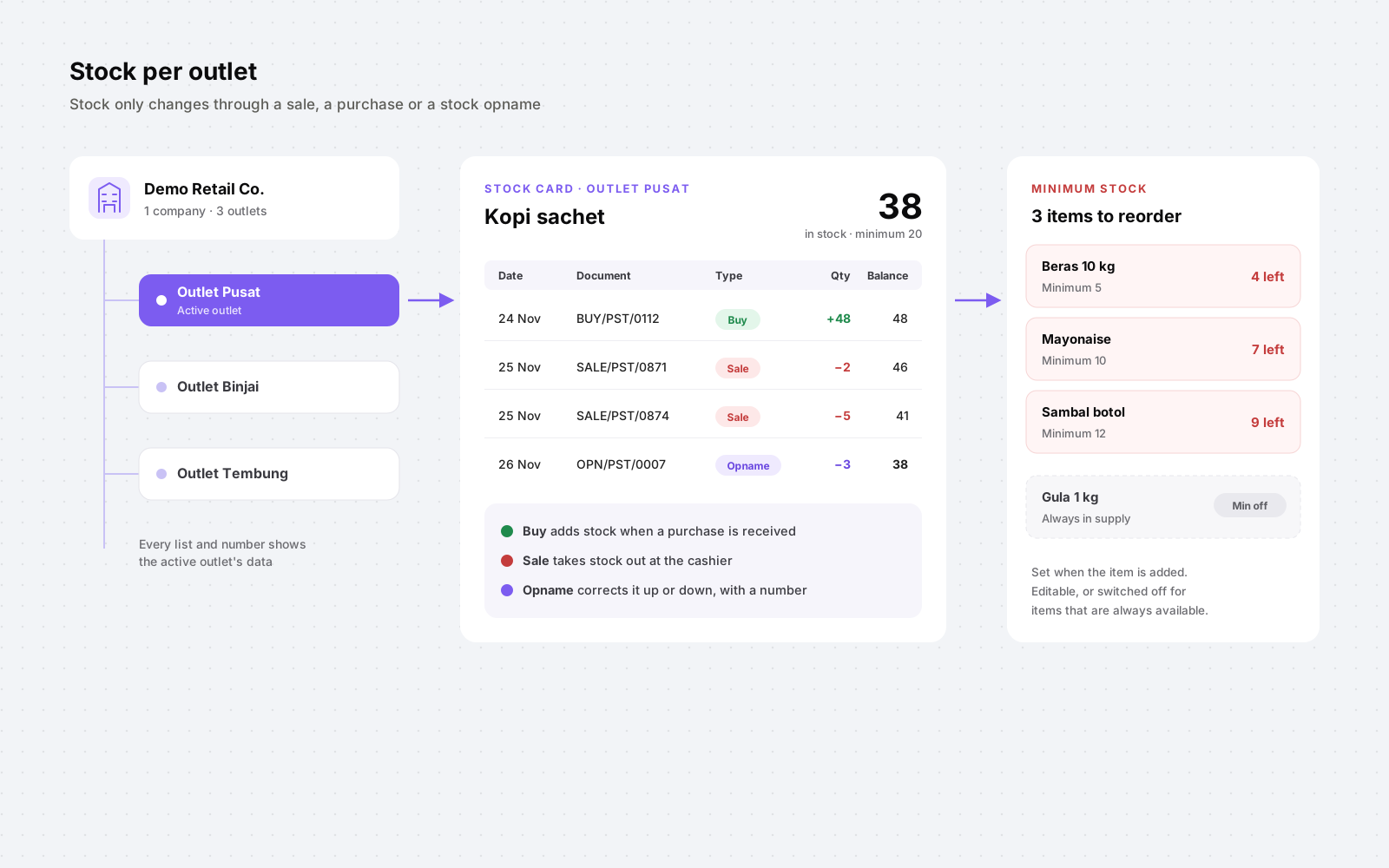
For a retail business with several outlets, I mapped how purchasing, sales and stock were handled, then built one web app to replace the spreadsheets. Each outlet sees its own stock, and stock only changes through a sale, a purchase or a stock opname.
- Role
- Systems analyst and full-stack developer (freelance)
- Period
- 2025
- Status
- Built, not in use yet
- 3ways stock can change: sale, purchase, opname
- 1numbered record for every stock correction
- 0stock fields edited by hand
The system is built and documented, but the business hasn't started using it yet.
Context
The problem
Purchasing, sales and stock were tracked in separate spreadsheets, and the business runs more than one outlet. Stock counts drifted, the same transaction got typed twice, each outlet's numbers lived in a different file, and nobody could say with confidence what was on the shelf, or why the shelf and the spreadsheet disagreed.
Solution
What we built
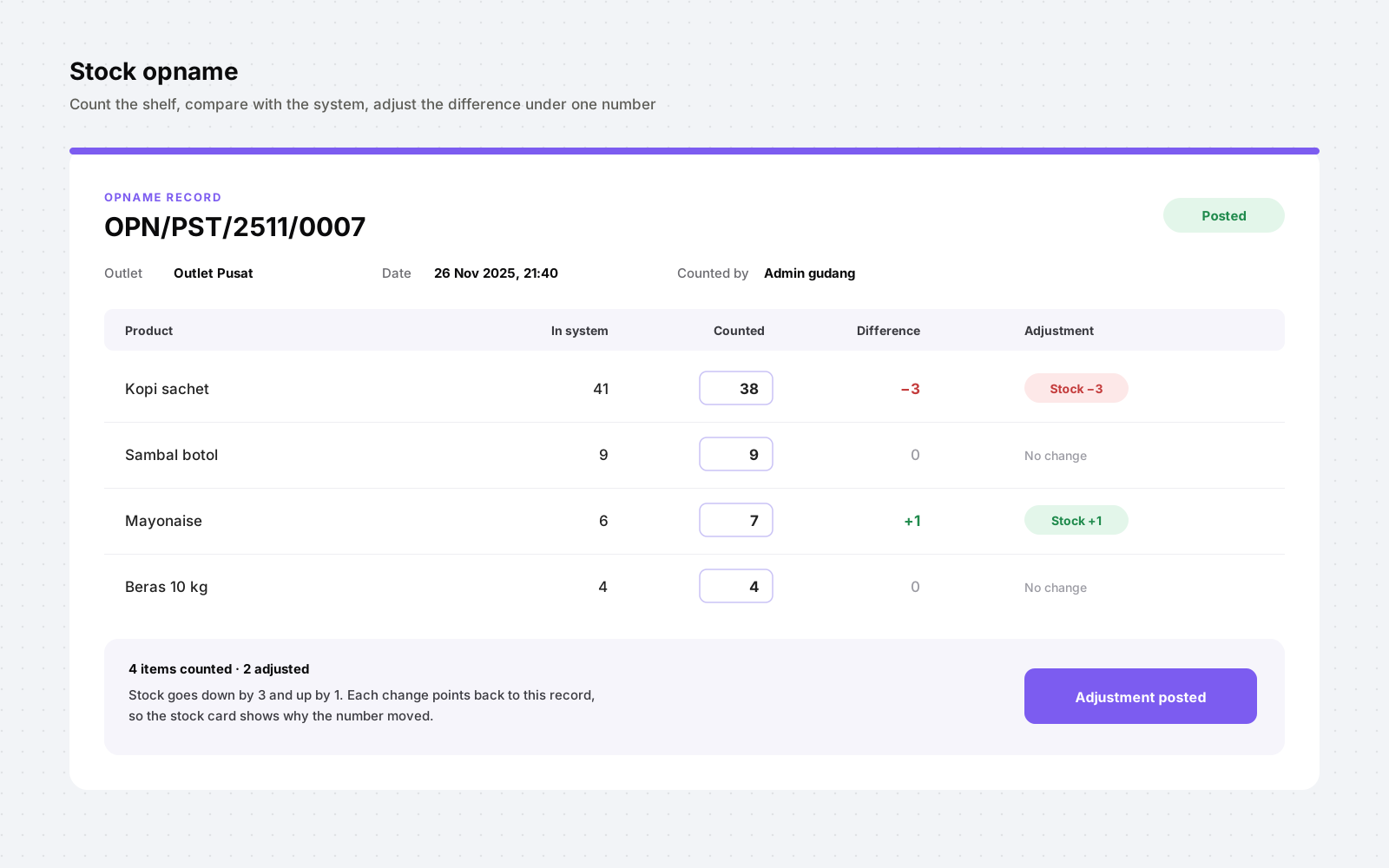
After requirement interviews, process diagrams and wireframes, I built one platform for the whole company. Every screen is scoped to an outlet. A sale at the cashier takes stock out, a purchase from a supplier puts it in, and items that reach their minimum stock show up on their own list. When the count in the warehouse doesn't match the system, a stock opname records both numbers and adjusts the difference under its own document number.
- Next.js
- TypeScript
- Zustand
- TanStack
- Tailwind CSS
- shadcn/ui
- Bun
- Hono
- Prisma
- Zod
- MySQL
- Docker
- GitHub Actions
Workflow
How stock moves
- Add the itemEach product gets a minimum stock when it's added. It can be changed later, or switched off for items that are always in supply.
- BuyPurchase requests become purchases from a supplier. Receiving them adds stock at the outlet.
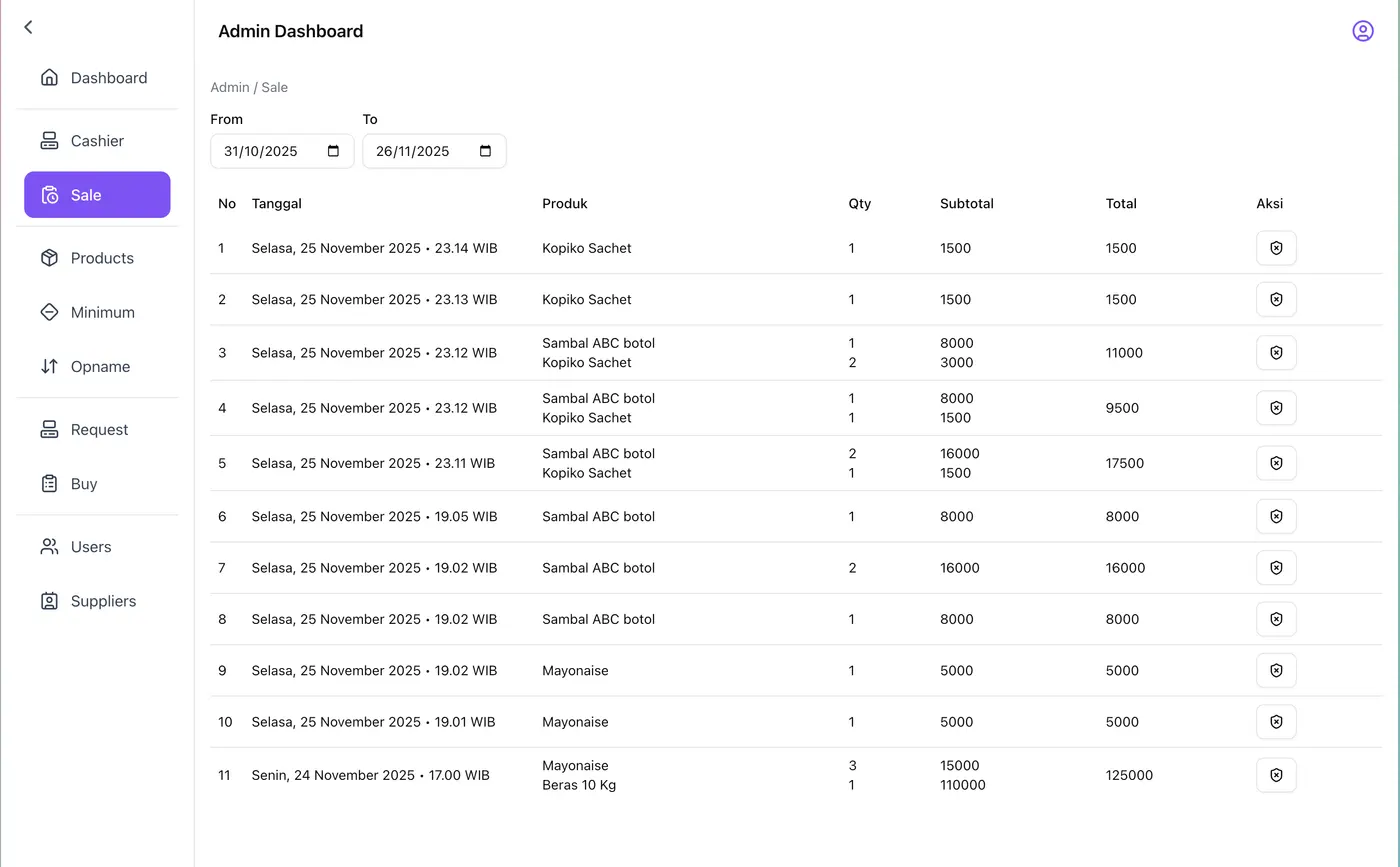
- SellEach sale at the cashier takes the sold quantity out of the outlet's stock.
- Watch the minimumItems at or below their minimum appear on the minimum stock list, so reordering starts before the shelf is empty.
- CountA stock opname shows the system quantity per item. Staff enter what they actually counted and see the difference.
- AdjustPosting the opname creates a numbered record and moves stock up or down by the difference.
Scope
What's in it
Modules
- Cashier and sales history
- Purchase requests, purchases and suppliers
- Products with minimum stock
- Minimum stock list
- Stock opname with numbered adjustment records
- Dashboard and user management
Multi-outlet
- One company, any number of outlets
- Stock is kept per item per outlet
- Lists, numbers and reports show the active outlet's data
Business rules
Rules the system enforces
- Stock changes only through a sale (out), a purchase (in) or a stock opname (in or out).
- Each outlet has its own stock; data is always shown for one outlet.
- Minimum stock is set when an item is added, can be edited, and can be switched off for items that are always available.
- Every opname gets its own number and keeps the system quantity, the counted quantity and the difference per item.
Decisions
Decisions and trade-offs
Stock is calculated, never typed
Stock levels come from sale, purchase and opname records instead of being edited by hand. That removes the most common spreadsheet mistake entirely.
Corrections are documents too
Real shelves drift from the system: breakage, expiry, miscounts. Instead of letting someone overwrite a number, an opname records what the system said, what was counted and the difference, under its own number. Every correction can be traced later.
The outlet is part of every query
Stock, sales and purchases all belong to an outlet, so one company can add outlets without mixing their numbers, and each outlet only sees its own data.
A minimum that can be switched off
Not every item needs a reorder alert. Items that are always in supply have their minimum switched off, so the minimum stock list only shows what actually needs action.
Shared validation with Zod
The same schemas check forms in the browser and requests on the server, so the rules can't drift apart.
My role
What I owned
- I own the product :)
- Ran the requirement sessions and mapped the current and target process.
- Produced the wireframes, process diagrams and data model, with stock kept per outlet.
- Designed the stock rules: sales, purchases, minimum stock and stock opname.
- Built the front end (Next.js, TypeScript, Zustand, TanStack).
- Built the API and database (Bun, Hono, Prisma, MySQL).
Artefacts
Reflection
What I'd do differently
The diagrams turned out to be the most useful thing I delivered. They settled arguments before there was any code to argue about, so I now start every client project with a one-page process map.
Have a process that should be a system?
I'm not looking for a new role, but I'm always up for a conversation about a system, a process or a collaboration.